The Honest Truth About Excel-Based HR
Let's start with something most software companies won't say: Excel is genuinely good at many things. It's flexible, it's familiar, and for a 10-person company, it might actually be the right tool.
But somewhere between 30 and 50 employees, Excel-based HR starts to crack. The cracks are small at first — a payroll error here, a missed compliance deadline there. By the time most companies switch, they've already lost significant money to those small, invisible failures.
This post is a frank comparison. No cherry-picking, no misleading statistics. Just an honest look at when Excel works, when it doesn't, and what a real switch costs and saves.
Where Excel Actually Wins
Before we criticize spreadsheets, let's be fair:
- Zero learning curve — Every HR person already knows Excel
- Highly customizable — You can build exactly the format you want
- No monthly fees — One-time cost (if you already have Office)
- Works offline — No internet dependency
- Suitable for <15 employees — At this scale, complexity is manageable
Where Excel Fails Indian HR Teams
1. The Attendance-Payroll Gap
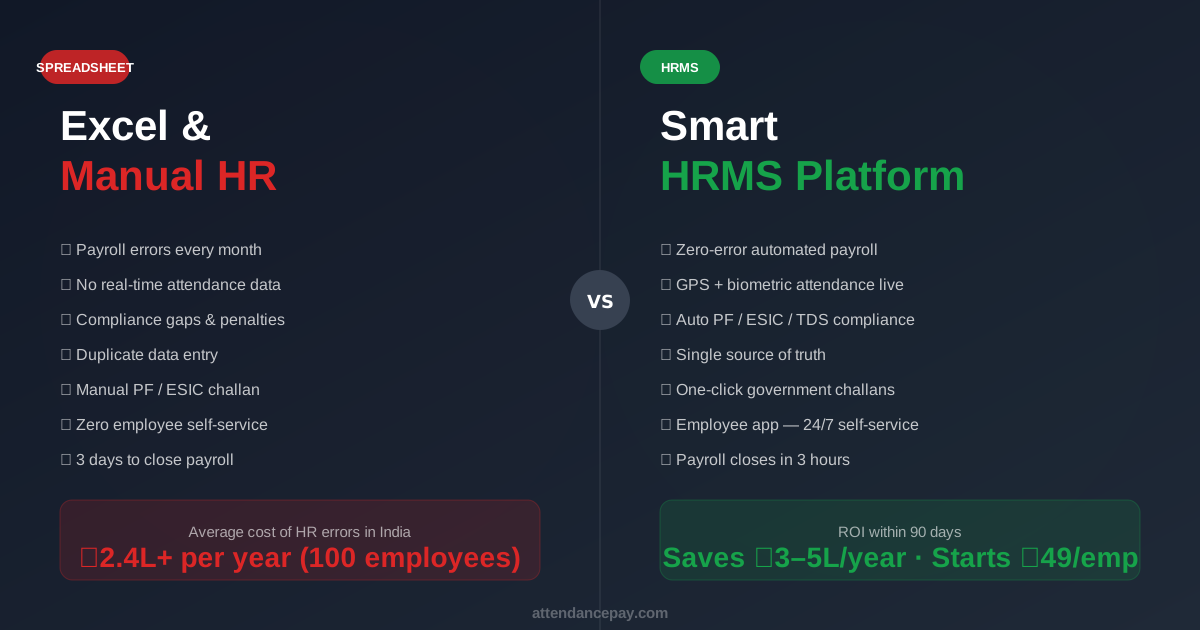
The biggest Excel problem in India isn't the payroll calculation — it's getting attendance data into the spreadsheet in the first place. The typical workflow:
- Security guard keeps a paper register at the door
- Someone (usually a junior HR staff) manually counts days at month-end
- Data is typed into Excel
- Payroll is calculated
- Errors from the manual transfer are discovered (and sometimes aren't)
In HRMS: Attendance flows automatically from biometric devices, GPS, or the mobile app directly into the payroll module. No manual transfer, no data entry errors.
2. PF/ESIC Calculation Errors
India's statutory deductions are not simple percentages. They have:
- Wage ceilings (ESIC: ₹21,000/month; PF voluntary above ₹15,000)
- Multiple components (Employee PF 12%, Employer PF 3.67%, EPS 8.33%, Admin charges 0.5%)
- New Wage Code definition changes that affect the calculation base
- Joining/exit mid-month proration rules
A single formula error in Excel applies the wrong rate to every employee for months before anyone notices. The tax department notices eventually — with interest and penalties.
3. No Audit Trail
When an employee disputes their payslip, can you prove exactly how it was calculated? In Excel, probably not — especially if the file has been edited by multiple people. In HRMS, every payroll run is timestamped, versioned, and tied to the exact attendance and salary data used to generate it.
4. Compliance Deadlines Are Easy to Miss
Indian payroll has at least 8 statutory deadlines per month across PF, ESIC, TDS, PT, and LWF — and they're all different dates. One missed deadline = ₹500/day in penalties (PF). Excel has no built-in reminder system.
5. Employee Self-Service Is Impossible
In Excel-based HR, employees must ask HR for:
- Their payslip (which HR must email manually)
- Their leave balance (which HR must look up)
- Their Form 16 at year-end
- Attendance corrections
This creates constant interruptions for HR staff. A company with 100 employees generates 15–20 such queries per day.
6. Multi-Location Is a Nightmare
If you have branches in Mumbai, Delhi, and Bengaluru — each with different professional tax slabs, different leave policies, and different attendance systems — maintaining separate Excel files and then consolidating them is genuinely unworkable at scale.
The Hidden Cost of Excel HR: Real Numbers
| Cost Source | Annual Cost (100 employees) |
|---|---|
| HR staff time on manual payroll (2 days × 12 months × ₹800/day) | ₹19,200 |
| HR staff time on attendance reconciliation (1 day × 12 months) | ₹9,600 |
| Payroll errors not caught (avg. 2% of payroll × ₹5L monthly wage bill) | ₹1,20,000 |
| Compliance penalties (1–2 late deposits/year × ₹500/day × 30 days) | ₹15,000–30,000 |
| HR time on employee queries (20 queries/day × 10 min × ₹400/hr) | ₹48,000 |
| Total Hidden Cost | ₹2,11,800 – ₹2,26,800/year |
Compare that to HRMS at ₹49/employee/month: ₹58,800/year for 100 employees. The HRMS pays for itself in saved time alone — the error reduction and penalty avoidance are pure bonus.
What the Switching Process Actually Looks Like
The #1 reason companies delay switching is fear of disruption. Here's what a realistic migration from Excel to HRMS looks like:
Week 1: Data Migration
- Upload employee master data from your Excel file (name, UAN, ESIC, bank account, salary components)
- Most HRMS platforms accept a standard CSV import — no manual re-entry
- Configure salary components to match your existing structure
Week 2: Attendance Setup
- Configure leave policies, shifts, and working days
- Connect biometric devices (ZKTeco, eSSL, etc.) via API or download
- Set up mobile app for field staff / WFH employees
Week 3: Test Payroll Run
- Run one month's payroll in parallel (HRMS + your old Excel)
- Compare outputs — differences highlight where your Excel had hidden errors
- Fix and rerun
Week 4: Go Live
- Process live payroll in HRMS
- Send payslips from the platform
- Archive Excel files (keep for 7 years as required)
Total disruption: less than 4 weeks. Most companies report full ROI within 90 days.
The 5 Questions to Ask Before Choosing an HRMS
- Is it built for India? — PF, ESIC, TDS, PT, LWF, and Labour Code compliance must be built-in, not add-ons
- Does it handle your attendance method? — Biometric, GPS, selfie, web punch, manual — check all you need
- Can it scale with you? — Adding 50 more employees shouldn't require a new plan or heavy configuration
- What's the true per-employee cost? — Watch for module-based pricing that adds up
- Is there a mobile app for employees? — Employee self-service is what eliminates HR query overload
Final Verdict
If you have fewer than 15 employees and simple salary structures: Excel is fine. Keep it.
If you have 30+ employees, multiple locations, field staff, or complex compliance requirements: the cost of not switching is already higher than the cost of switching. Every month you wait is another month of hidden losses.
AttendancePay was designed specifically for this transition — import your existing data, configure your existing policies, and run your first automated payroll in under a week.
Start with a free trial. Import your employee data, run a test payroll, and see the difference before you commit. Get started free →
Related: Check AttendancePay pricing or see a full feature comparison against other HRMS platforms.