
The Indian Manager's Dilemma: Visibility Without Micromanaging
Ask any Indian manager in a hybrid or remote team and they'll describe the same situation: they're not sure who's working on what, status updates come via WhatsApp at unpredictable times, and the only way to know if something is done is to ask — repeatedly.
The typical response is one of two extremes: either over-communicate (daily check-in calls, constant pings) which breeds resentment and kills productivity, or under-communicate and find out things slipped only at the deadline.
There's a third option that high-performing Indian teams are switching to in 2026: structured task management inside your HRMS.
Why Task Management Should Be Part of Your HRMS (Not a Separate Tool)
Most Indian companies use a patchwork of tools: attendance on one system, payroll on another, and tasks on yet another (Trello, Asana, Jira, or Excel). The problem:
- Employee data is fragmented — you can't see that Rahul has 12 open tasks AND hasn't taken leave in 90 days AND is showing attendance irregularities — all at once
- HR doesn't have visibility into work output — only attendance and payroll
- Task tools are optional — employees ignore them; managers give up enforcing them
- You're paying for three separate tools when one would do
When task management is inside your HRMS, it becomes part of the work culture by default — not an optional add-on that some people use and others don't. And managers see the full picture of each employee's workload alongside their attendance and leave patterns.
What Good Task Management Looks Like for Indian Teams
The Task Board (Not Just a List)
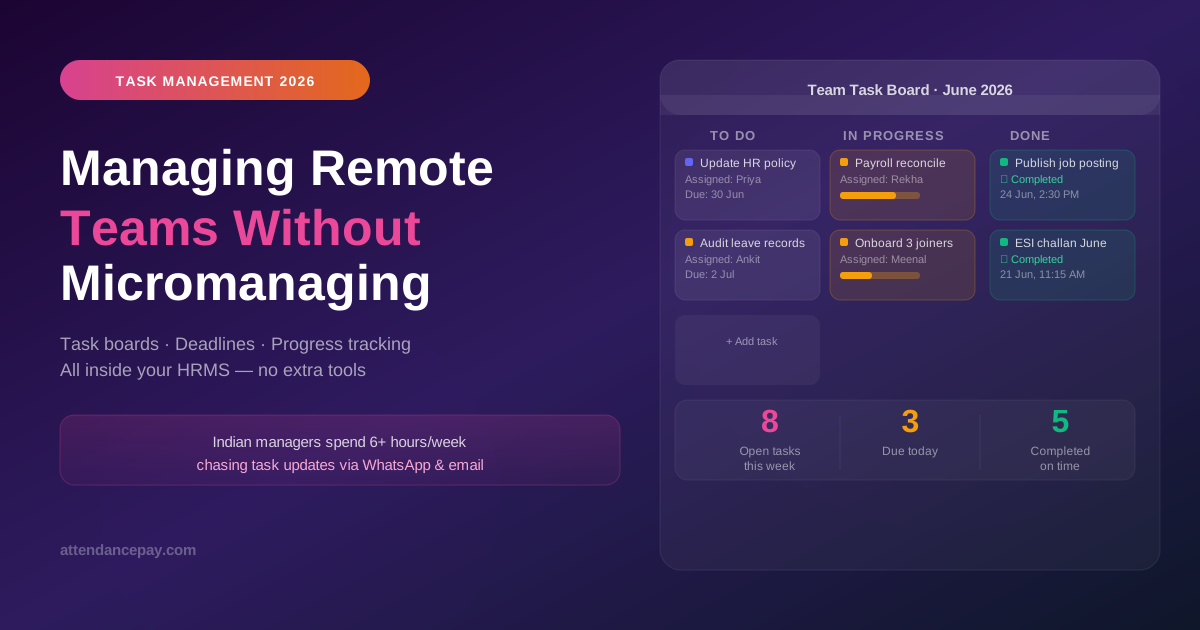
A task board shows work as cards in columns: To Do → In Progress → Review → Done. Each card has an owner, a deadline, a priority level, and optional attachments or notes.
The power isn't in the tool — it's in the visible accountability it creates. When a task is on the board with someone's name and a deadline, that person knows it's visible. Managers know it's visible. There's no ambiguity about whether the task exists or who owns it.
What Each Task Should Capture
- Title — Clear, action-oriented (not "website" but "Update FAQ page with new pricing")
- Assignee — One person responsible (not a team)
- Due date — Specific date, not "this week"
- Priority — Critical / High / Normal / Low
- Status — To Do / In Progress / Blocked / Done
- Description — Enough context that the assignee can start without asking questions
The Manager's View: What You Should See Each Morning
A good HRMS task dashboard shows the manager:
- Overdue tasks — What was supposed to be done yesterday but isn't
- Due today — What needs to be completed before end of day
- Team workload — How many open tasks each team member has (spot overload and underload)
- Blocked tasks — Tasks that are stuck waiting for someone or something
- Recent completions — What got done in the last 24 hours
With this view, the manager's morning is: open dashboard, scan for problems, address blockers, move on. No status meetings needed.
5 Practical Patterns Indian Managers Use
1. The Monday Task Creation Ritual (15 minutes)
Every Monday morning, the manager creates the week's tasks for each team member in the HRMS. This takes 15 minutes but saves hours of "what should I work on?" conversations throughout the week. Team members start the week with clarity; the manager starts the week with confidence that work is assigned.
2. Status Updates Without Status Meetings
Instead of a 30-minute daily standup call, employees update their task statuses in the HRMS at the end of each day. The manager reviews the board the next morning. For async teams (different time zones, different shifts), this is the only sustainable way to stay aligned.
3. The Blocked Flag
When an employee marks a task as "Blocked", it surfaces immediately in the manager's view with the reason (e.g., "Waiting for client approval", "Need access to the design files"). The manager can then unblock it — rather than discovering the delay at the deadline.
4. Workload Balancing
Before assigning a new task, check the team workload view. If Priya has 8 open tasks and Ankit has 2, the new task goes to Ankit — not to Priya because she's the first person who comes to mind. This simple habit prevents burnout and underutilization simultaneously.
5. Task-Based Performance Reviews
At performance review time, pull the 90-day task history for each employee: tasks completed on time, tasks overdue, task complexity, task volume. This gives the review factual grounding rather than relying on subjective recall.
How Task Management Integrates with Attendance in HRMS
This is the advantage of having tasks inside your HRMS instead of a separate tool:
- An employee marked absent for 3 days but has 5 tasks due this week → the manager sees this in one view and can proactively reassign or push deadlines
- An employee with no open tasks is showing late check-ins → underwork and disengagement visible together
- A team has low task completion during a particular period → cross-reference with leave data to confirm it was a holiday week or identify a productivity issue
Common Mistakes Indian Managers Make with Task Tools
Mistake 1: Creating Tasks for Everything
Not everything needs a task. Routine, daily work (answer emails, respond to customer calls) doesn't need a card on the board. Tasks should be for outcomes — deliverables with clear done states. If you're creating 30 tasks per day per employee, you've over-engineered the process.
Mistake 2: Not Closing Old Tasks
Boards clog up with completed tasks that no one has archived. Set a weekly habit (Friday afternoon, 5 minutes) to close completed tasks and clean up the board. A clean board is used; a cluttered one is ignored.
Mistake 3: Using Tasks as Surveillance
If employees feel tasks are being created to monitor every minute of their day, they'll game the system (constant status updates that say nothing) or disengage. Tasks should track outcomes, not activities.
Mistake 4: Not Handling Dependencies
Task B can only start after Task A is done. If this isn't captured in the task description, Task B assignee waits without knowing why. Add "Blocked by: [Task A]" in the task description to make dependencies explicit.
What to Look for in an HRMS Task Module
- Kanban board view + List view (different people prefer different layouts)
- Due date with reminders — Push notifications to the employee's app when a deadline approaches
- Priority levels — At least 3 (Critical, Normal, Low)
- Assignee flexibility — One primary owner, optional CC for others
- File attachments — Documents, images, and links in the task card
- Comment thread — Discussion stays on the task, not in WhatsApp
- Manager overview — Team view showing all open tasks by person
- Report export — Weekly/monthly task completion reports for performance review
Making the Transition: Getting Your Team to Actually Use the Task Board
The #1 reason task tools fail is adoption. Here's what works for Indian teams:
- Lead by example for 2 weeks — The manager creates all tasks in the HRMS and references only the board in conversations ("Have you updated the task status?"). Team members follow the culture set by the manager.
- Replace one WhatsApp group with the task board — Pick one project and do all task coordination via the HRMS only. Run it in parallel with WhatsApp for 1 week, then drop the WhatsApp group.
- Celebrate completions publicly — When someone closes a task on time, acknowledge it in the team channel. This makes the board feel rewarding, not policing.
- Review the board in every team meeting — Don't go around the table asking for updates. Just screenshare the task board. The updates are already there.
Conclusion
Managing remote and hybrid teams without micromanaging is possible — but only with the right structure. That structure isn't more check-in calls or WhatsApp messages. It's a shared task board that everyone uses, with outcomes visible to everyone.
When task management is inside your HRMS — alongside attendance, leave, and payroll — you get the full picture of your team's work without needing to ask for it.
AttendancePay includes task management, attendance, leave, and payroll in one platform. Start your free trial and set up your first team task board in under 20 minutes.